
Architecture
Gaming
UI/HUD Systems
State-Driven
Engine-Aware
The Gaming UI & HUD System applies the LS Core framework to state-driven, engine-aware interactive products — where interfaces must remain readable and responsive under speed, motion, constant state changes, and real-time performance constraints.
While the underlying system logic mirrors the Enterprise ecosystem architecture at a structural level, it is restructured for runtime conditions — prioritising gameplay states, player cognition, and engine-level implementation over organisational scale.
Scope & Context
A game is treated as one product, even when adapted across multiple platforms or devices.
Unlike Enterprise ecosystems, where multiple products coexist under a shared brand, a game evolves as a single experience — expanded through mechanics, modes, updates, and content rather than parallel product lines.
The system is designed to support this evolution without fragmenting structure or intent.
System Architecture
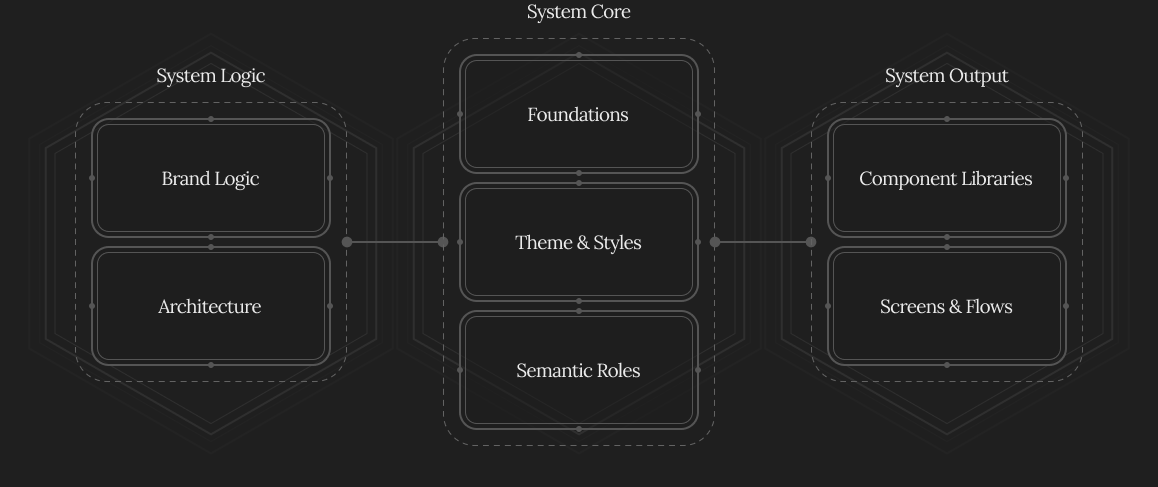
The Gaming system begins with structure before design.
This includes:
- clear system architecture and file structure
- consistent naming conventions
- defined separation between gameplay states, interface logic, and engine implementation
- UI, HUD, and external outputs aligned to the product’s visual and interaction language
Everything is tailored to the game, engine, and production pipeline at hand — never copied blindly from previous projects.
Visual and interaction definition always come first.
In games, interface identity is shaped by interaction clarity, state feedback, and readability under motion — acting as the connective tissue across in-game UI, HUD elements, marketing assets, websites, and promotional materials.
Foundations
Foundations establish the primitives required for game UI and HUD systems.
They prioritise:
- readability under motion
- contrast and visual signalling
- legibility across resolutions and viewing distances
- safe zones and camera interaction
Foundations are introduced incrementally — starting only with what is necessary — and expand alongside gameplay mechanics and features, avoiding premature complexity while supporting long-term scalability.
Themes
Themes in gaming operate differently from Enterprise products.
Rather than primarily responding to responsiveness or light/dark modes, Themes are used to represent:
- game modes
- worlds or environments
- factions or progression stages
- platform-specific expressions
Themes map onto shared Foundations, allowing the game to evolve visually without destabilising system logic.
Themes act as controlled expressions of the same system, not as separate redesigns.
In multi-platform scenarios, a game may use:
- a shared Theme with platform-specific adjustments, or
- distinct Themes per platform
Both approaches remain part of a single product system.
Semantic Roles
Semantic Roles assign meaning and intent to themes and foundations, but their terminology and structure align with game-engine logic.
Roles define:
- information priority and hierarchy
- danger versus safety
- temporary versus persistent states
- player feedback and affordances
Roles are never predefined in full. They grow alongside mechanics and features, supporting both design reasoning and implementation logic.
They become a shared language between designers and developers.
Component Systems
Component Systems are developed after architecture, foundations, themes, and roles are established.
Components are:
- structured around gameplay systems
- designed for state changes and animation
- prepared for translation into game engines (e.g. Unity)
Assets are organised to support:
- clear naming and export rules
- separation between visual reference assets and engine-built elements
- performance considerations such as file size, reuse, and flexibility
Some components exist as fully constructed visual references, while others are designed to be reconstructed or parameterised in-engine.
Libraries & Collaboration
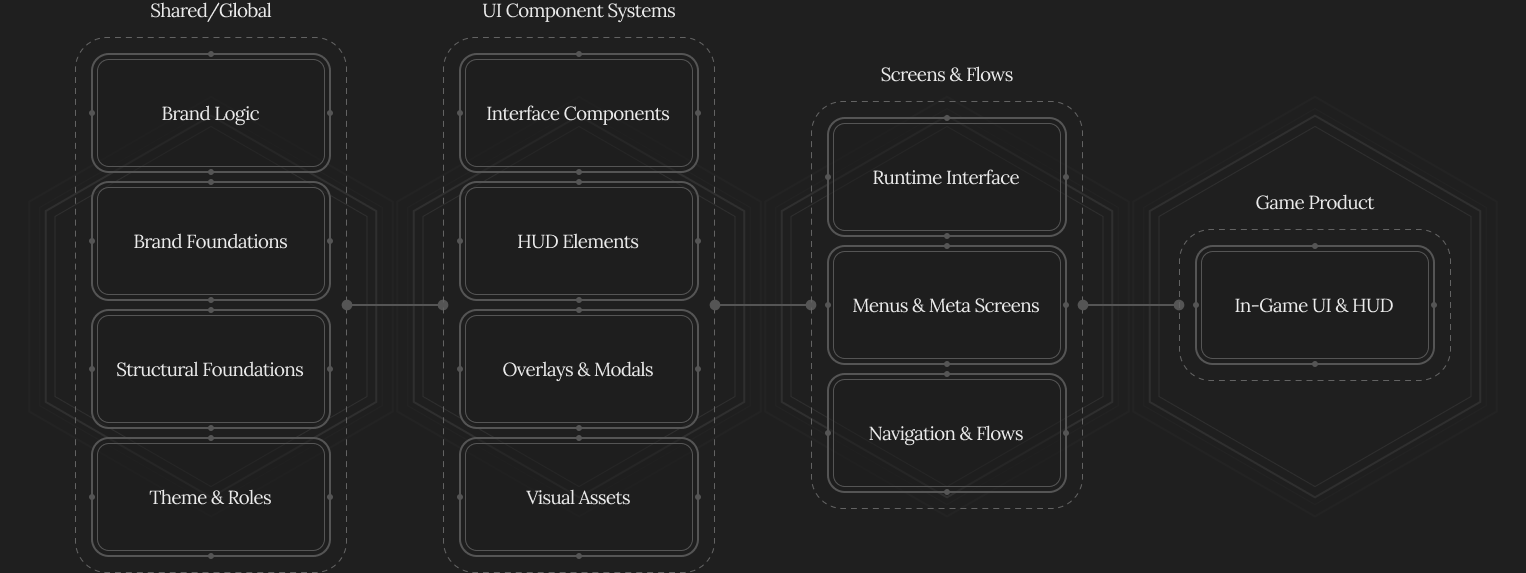
Large games often benefit from multiple Component Libraries, organised by function:
- HUD elements
- inventory systems and icons
- overlays and popups
- art and visual assets
This keeps files lightweight and enables parallel work across teams.
When adapting a game across devices:
- shared libraries maintain consistency
- screen layouts change per platform
- in some cases, separate component libraries or Themes are introduced
All variations remain governed by the same system logic.
Screens, Flows & Prototyping
Screens in games represent:
- player journeys and onboarding
- menus and meta systems
- progression loops
- real-time HUD behaviour
Flows map complex user journeys, transitions, states, and conditions.
Prototyping focuses on clarity under gameplay actions, timing, feedback, and transition logic. Motion intent and animation demos are communicated at screen and flow level.
System in Production
The Gaming UI & HUD System is designed to withstand:
- gameplay iteration
- balance changes
- new mechanics
- live updates and content expansions
By maintaining clear separation, intent, and ownership, the system supports creative freedom without sacrificing structure — even under constant change.
Next Steps
This system applies LS Core to interactive, state-driven environments — shaping how structure, clarity, and visual logic hold up under real-time conditions and constant change.

If you’re building complex game interfaces or live products — I collaborate with studios and teams to design scalable HUD and UI systems that hold up under real gameplay conditions.
 Back to work
© 2006–2026 Loris Stavrinides
Client and third-party work © respective copyright holders
