
Architecture
Enterprise
UI/UX Systems
Product-Scale
Multi-Team Structure
The Enterprise UI/UX Ecosystem applies the LS Core framework to complex digital products — demonstrating how I approach design-system architecture for long-lived platforms, multiple user roles, and multidisciplinary teams.
It explores how system-driven thinking can become an operational design structure, supporting consistency, governance, and growth across products, surfaces, contributors, and time.
While designed for large-scale environments, the same architecture can be applied to smaller products — intentionally reduced in scope without losing structural clarity.
Scope & Context
Enterprise products are shaped by:
- multiple user roles and permissions
- dense information and workflows
- long product lifecycles
- parallel workstreams across design, development, marketing, and business
The purpose of this system is not to prescribe visuals, but to establish a coherent structure that allows teams to move fast without breaking consistency or intent.
The entire architecture is built on LS Core — adapted to the realities of each product, team, and organisation.
System Architecture
The Enterprise system begins with structure before design.
This includes:
- clear system architecture and file structure
- consistent naming conventions
- defined separation of concerns
- brand logic aligned with product reality
Everything is tailored to the product and the team at hand — never copied blindly from previous work.
Brand definition always comes first.
Whether supporting a single product or multiple products within the same organisation, brand logic acts as the connective tissue across product UI, marketing ecosystems, internal tools, presentations, and documentation.
In same-brand enterprise ecosystems, this shared brand logic extends into global libraries — including foundations, theme, roles, utility, icons, visual assets, shared styles, and global UI components.
Product-level libraries then build on top of this shared system, allowing each product to define its own roles, local modes, components, and screens without fragmenting the wider ecosystem.
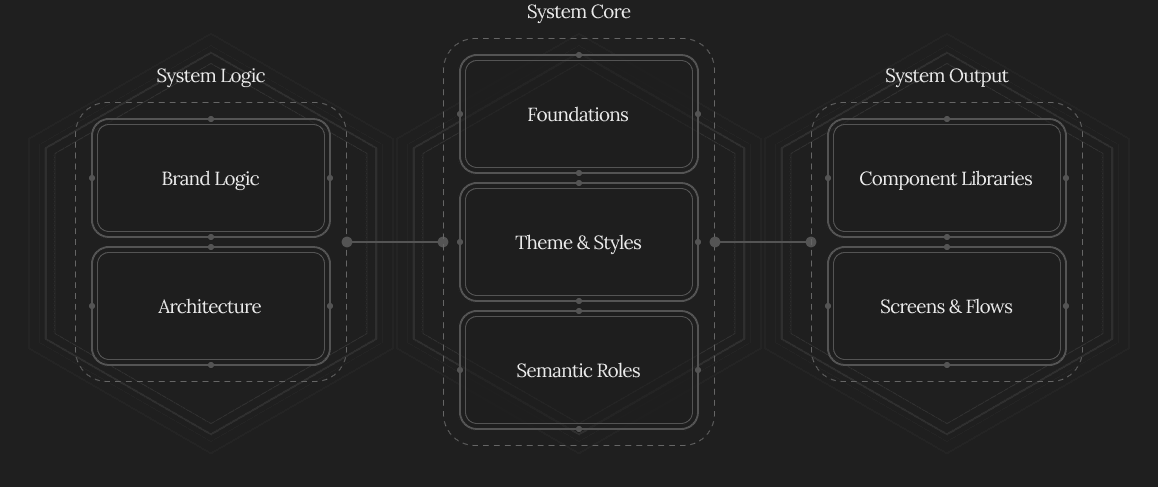
Foundations
Foundations define the primitives of the system.
This is where core design tokens are established — including:
- colour scales
- brand colours
- typography
- layout and spacing logic
Foundations never start “complete”.
Only the primitives required at the time are introduced, allowing the system to grow naturally as products evolve or new products are added.
This prevents premature complexity while preserving long-term scalability.
Logic & Governance
System logic applies across both architecture and workflow.
Key considerations include:
- separation between brand-level assets and product-level systems
- shared public libraries vs local product assets
- access control and role-based ownership within tools
- reducing risk from multi-person editing and accidental drift
Marketing ecosystems, internal tools, and business-facing materials draw from shared foundations — adapting locally where needed without destabilising the core system.
AI usage, roadmaps, company philosophy, and team structures are considered during system setup, ensuring the architecture supports real operational needs.
Documentation is introduced only when it adds value — evolving alongside the system rather than preceding it.
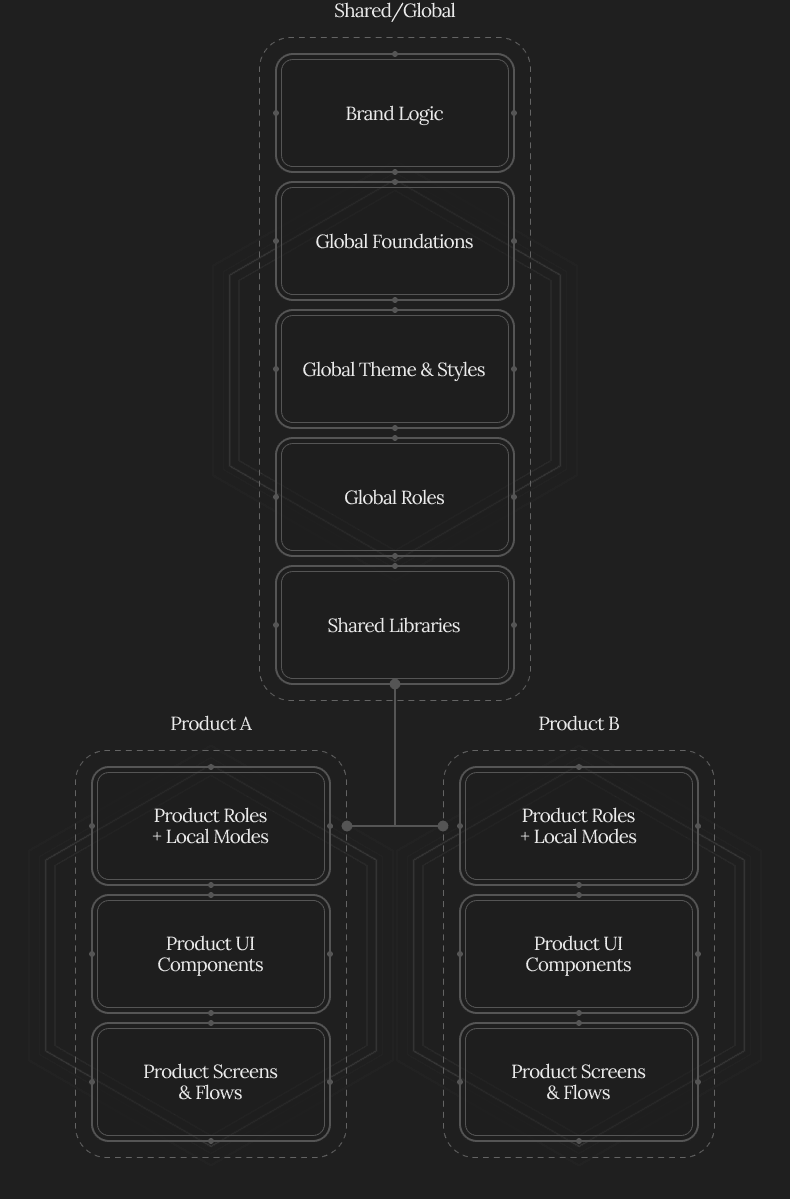
Global Theme & Styles
Once Foundations are established, the shared Global Theme defines how those primitives become usable across the ecosystem.
The Global Theme supports:
- brand expression
- light / dark modes
- shared colour and typography behaviour
- cross-product consistency
- shared visual logic across UI, marketing, and business-facing materials
In same-brand enterprise environments, Themes do not always need to be recreated per product.
Instead, the Global Theme acts as the shared expression layer, while product-level libraries introduce local adaptations where needed through Product Roles, local modes, and product-specific styles.
This keeps the ecosystem consistent while still allowing individual products to respond to their own workflows, users, devices, and constraints.
Global & Product Roles
Semantic Roles apply meaning and intent to the system.
At global level, Roles define shared usage logic across the wider ecosystem — supporting common interface patterns, accessibility, consistency, and alignment with development logic.
At product level, Roles become more specific.
Product Roles allow each product to define local meaning, usage rules, modes, and styles without destabilising the shared global system.
This supports:
- shared consistency across products
- local product flexibility
- clear reasoning across interfaces
- stronger design-development alignment
Roles are never predefined in full.
They emerge and expand as design work progresses, ensuring the system reflects real product needs rather than hypothetical completeness.
This layer creates a shared language between design and development — reducing ambiguity during implementation.
Components & Screens
Components and Screens are built once the global architecture, foundations, theme, roles, and product-level logic are in place.
In enterprise ecosystems, components can exist at both global and product level.
This is where creative execution happens.
- Global components handle shared interface patterns used across the ecosystem.
- Product components handle product-specific needs, behaviours, layouts, and workflows.
Components are:
- designed using Semantic Roles
- structured for responsiveness and variants
- organised into libraries by category and purpose
- governed through clear naming and usage rules
Libraries are treated as products themselves — accessible, understandable, and scalable across teams.
Screens are developed alongside components, often beginning in exploratory form.
Component needs emerge from screen design decisions, not the other way around.
Screen files focus on:
- layouts
- flows
- prototypes
- stakeholder and developer communication
Designers maintain and evolve component libraries in parallel — while teams collaborate primarily through screens and prototypes.
Light, developer-friendly documentation lives at the component level — explaining usage, variants, and implementation logic.
Product-specific styles, modes, and behaviours are defined locally where needed — always aligned with the global system and the product’s own intent and constraints.
System in Practice
When the full architecture is in place:
- responsibilities between team members are clear
- workflows remain coherent as teams grow
- brand, product, and marketing operate independently yet consistently
Global libraries provide the common language of the ecosystem, while product-level libraries preserve the specific logic of each product.
Marketing and business teams can use global libraries and adapted local styles — supporting their needs without introducing system drift.
The result is a living enterprise system that remains flexible, controlled, and resilient over time.
Next Steps
This system is a practical application of LS Core — my framework for system-driven design, defining how structure, logic, and intent scale across products and teams.

If you’re navigating complexity across product, platform, or organisation — I work with teams and founders to bring structure, alignment, and long-term resilience into real-world systems.
 Back to work
© 2006–2026 Loris Stavrinides
Client and third-party work © respective copyright holders
